
Contact Boards turn the people you know into a Kanban board. Drag a card when something moves, and you always know whom to contact next.
NEW IN STARRISE CONTACTS 1.7
See Where You Stand with Everyone
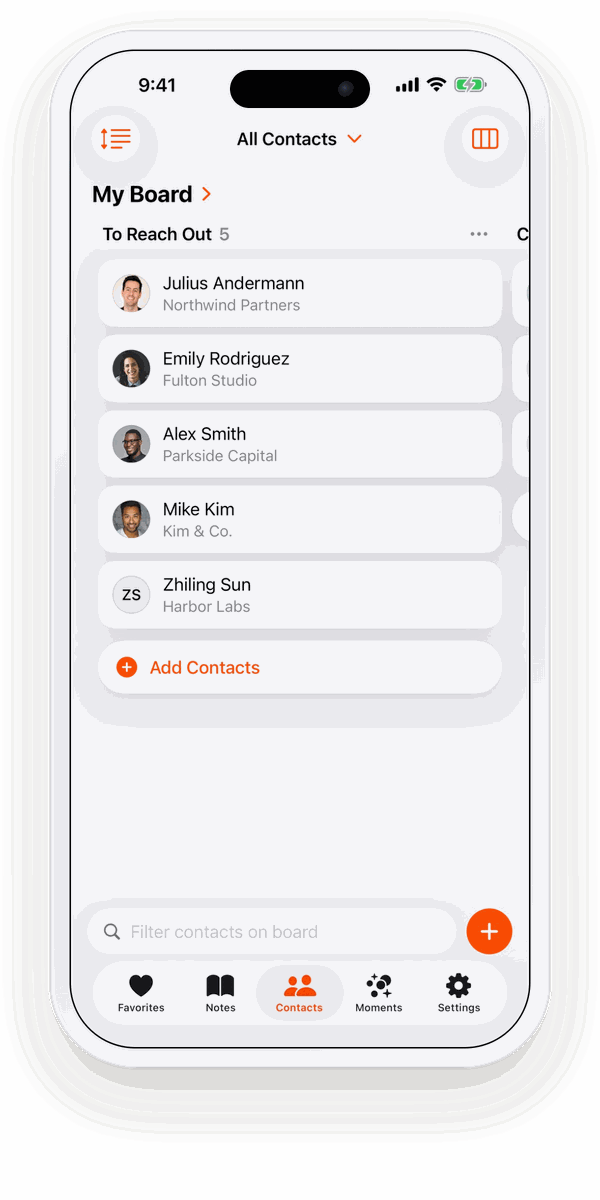
Part of Starrise Contacts Pro. Try it on a sample board for free.
WHY A BOARD
A list shows who you know. A board shows where you stand.
Who still needs a first message, who answered, whom you met last week, who is waiting for your proposal. One look, and you know.






Know who’s next
The first column is your to-do list of people. No more scrolling through hundreds of contacts.
Move in a second
A call went well? Drag the card to the next column. That’s all the bookkeeping there is.
See progress at a glance
Every column shows how many people are in it, so you see how far you’ve come.
TEMPLATES
A board for every part of your life
Every new board starts from a template with its columns in place. Rename, add or reorder them whenever you like.
Networking
- To Reach Out
- Contacted
- Met
- Stay in Touch
Turn the names from last week’s conference into real connections.
Networking trackerSales & Clients
- Lead
- Contacted
- Proposal
- Client
A simple sales pipeline for freelancers and small businesses.
Sales pipelineHiring
- Sourced
- Reached Out
- Interviewing
- Hired
Keep the candidates you’re courting moving, one board per role.
Candidate pipelineHoliday Cards & Gifts
- To Do
- Bought / Written
- Sent / Given
Know who still gets a card this December, and whom you forgot.
Christmas card listPlus To-Do (To Do · Doing · Done) and an Empty board for anything else.
FEATURES
Simple to keep up, powerful when you need it
HOW IT WORKS
Your first board in under a minute
Open the board
On iPhone and iPad, switch Contacts from List to Board in the view menu. On the Mac, choose Boards in the sidebar (⌘6).
Add people
Tap Add Contacts and pick the people you want on the board. Each one gets a card.
Drag as things move
Wrote to someone, met them, closed the deal? Drag their card one column on.
PRICING
Our Transparent Pricing
Standard
Free
on the App Store
- A sample board on fictional contacts
- All Basic Features, excl. Pro
- iPhone, iPad & Mac: one app, every device
- No subscription needed
- Upgrade to Pro anytime
Pro
$0.99
per month
or $5.99 per year
- Contact Boards, as many as you like
- All Basic Features
- Keep in Touch Reminders
- iCloud Sync
- Moments from Notes
- To-dos with Reminders
- AI Note Summary
- Name Days
- Restore Deleted Contacts
- Business Card Scanner
- Voice Add
One Pro subscription unlocks Pro on iPhone, iPad and Mac. Prices in the US App Store.
FAQ
Frequently Asked Questions
A Kanban view of your contacts. You make columns for the steps that matter to you, add people as cards, and drag each card to the next column as things move. Boards are new in Starrise Contacts 1.7 and part of Pro.
Yes. Create as many boards as you like, each from a template: Networking, Sales & Clients, Hiring, Holiday Cards & Gifts, To-Do or Empty. The same person can be on several boards, with one card on each.
Yes. Add, rename and delete columns, and drag a column by its header to move it.
No. A board only holds cards that point to your contacts. Removing a card or deleting a board leaves the contact as it is.
Yes, with iCloud Sync (Pro), through your own iCloud account. Nothing is sent to us.
Boards are a Pro feature, $0.99 a month or $5.99 a year in the US. Without Pro you can look at a sample board on fictional contacts.