Skip to main contentSkip to footer
RECRUITING

Your Candidate Pipeline, on Your Phone

Your applicant tracking system knows the applications. The candidates you found yourself, the ones you are courting for a role that isn’t open yet, often live in your head and your phone. Starrise Contacts gives them a board: Sourced, Reached Out, Interviewing, Hired.

Updated November 2026
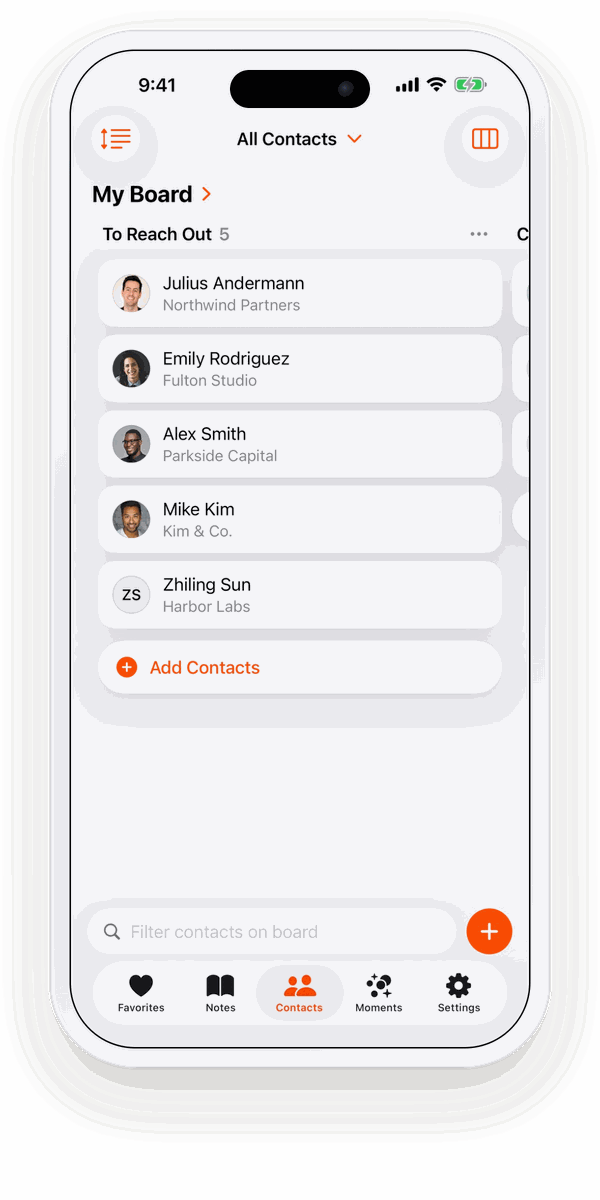
A hiring board in Starrise Contacts with candidates as cards

One board per role

Create a board for each role you are filling, from the Hiring template. The same candidate can sit on two boards at once, with one card on each, so someone who wasn’t right for one role is already on the board for the next.

  • Sourced: people you found and want to approach.
  • Reached Out: you sent the first message.
  • Interviewing: in conversations with you or the hiring manager.
  • Hired: placed. Keep in touch for the next move.

How to set it up

  1. Open Contacts in Starrise Contacts and tap the view menu at the top right. Choose Board. On the Mac, choose Boards in the sidebar (⌘6).
  2. Create a new board and start from the Hiring template. It comes with the columns Sourced, Reached Out, Interviewing and Hired.
  3. Tap Add Contacts and tap the people you want on the board. Each person gets one card.
  4. Drag a card to the next column whenever something changes. Rename, add or delete columns until the board fits the way you work.

Everything about a candidate in one place

  • Dated notes on salary expectations, notice period and what they want next.
  • Quick actions to call, email or message on WhatsApp, Telegram or Signal with one tap.
  • To-dos with reminders (Pro) for the next check-in.
  • Private by design: candidates stay in your own contacts and iCloud, never on our servers.

Starrise Contacts is a personal tool, not an applicant tracking system: no job postings, no application forms, no shared team boards. See how recruiters use the rest of the app in the personal CRM for recruiters.

Contact Boards are part of Starrise Contacts Pro: $0.99 a month or $5.99 a year in the US. Without Pro you can look at a sample board on fictional contacts, so you see how it works before you decide.

Related

All use cases →

FAQ

Frequently Asked Questions

Can I track candidates on my iPhone?

Yes. With Contact Boards (Pro) in Starrise Contacts, start a board from the Hiring template and drag candidates from Sourced to Reached Out, Interviewing and Hired.

Does it replace my applicant tracking system?

No. It has no job postings, applications or team workflows. Use it for your personal pipeline: the people you source and stay in touch with yourself.

Can one candidate be on several boards?

Yes. Each board has one card per person, and the same person can be on as many boards as you like.

GET STARRISE CONTACTS

Try Starrise Contacts for free

Starrise Contacts

Starrise Contacts works on the contacts already on your iPhone, iPad and Mac. No account, nothing to import. Free to download, with an optional Pro subscription.

Free on iPhone, iPad and Mac. Pro costs $0.99 per month or $5.99 per year in the US.

Explore more Starrise Contacts guides

Find the right way to manage your contacts and relationships on iPhone, iPad and Mac.

Contacts App for MaciCloud Sync for ContactsPersonal CRM AppContact Notes AppBirthday Reminder AppBusiness Card ScannerNetworking CRMKeep in Touch RemindersContact BoardsRemember Names & DetailsBest Contacts App for iPhonePersonal CRM for FreelancersAddress Book AppOrganize & Tag ContactsPrivate Personal CRMName Day CalendarsBest Personal CRM AppsCardhop AlternativeDex AlternativeApple Contacts vs StarriseApple Contacts AlternativeRemember Birthdays on iPhoneHow to Keep in TouchHow-to GuidesComparisonsUse CasesFree Tools