Skip to main contentSkip to footer
SALES PIPELINE

A Simple Sales Pipeline on Your iPhone

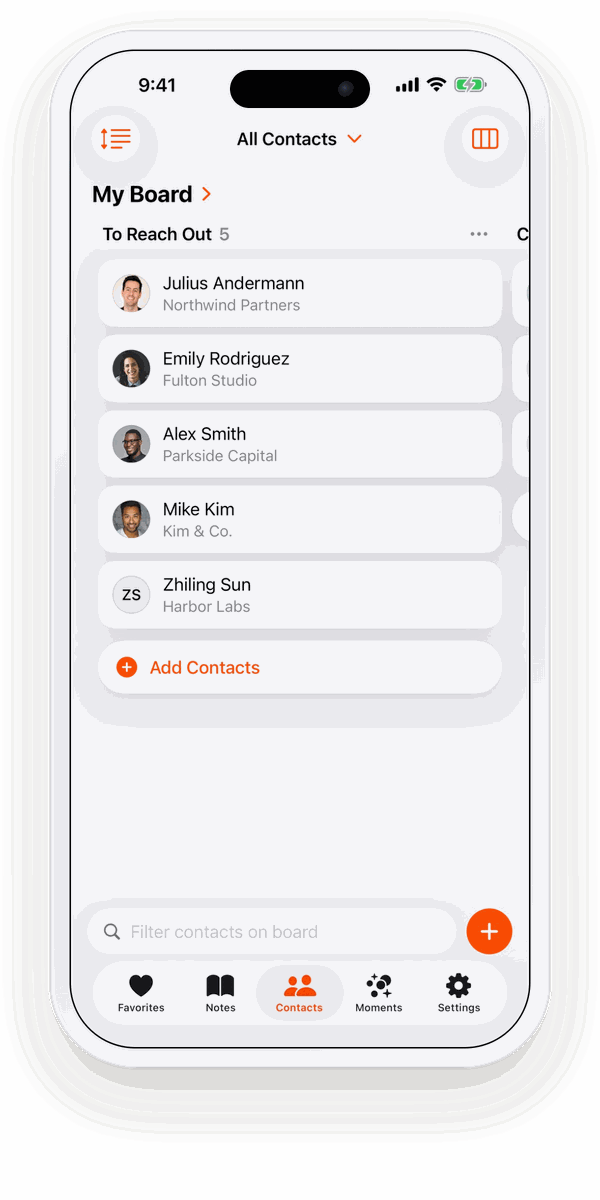
If you sell on your own, as a freelancer, consultant or small business, you don’t need a sales platform. You need to see who is a lead, who you’ve contacted, who has your proposal and who is already a client. Starrise Contacts puts exactly that on a board, made of the contacts already on your phone.

Updated November 2026

A sales pipeline board in Starrise Contacts on iPhone

Four columns, every lead

The Sales & Clients template starts you with four columns. Rename them to your own steps if you like, for example “Call booked” or “Invoice sent”.

  • Lead: someone who might need what you offer, from a referral, an event or an inquiry.
  • Contacted: you reached out and are waiting for an answer.
  • Proposal: they have your offer. Time to follow up.
  • Client: the work is yours. Keep them close for the next project and for referrals.

How to set it up

  1. Open Contacts in Starrise Contacts and tap the view menu at the top right. Choose Board. On the Mac, choose Boards in the sidebar (⌘6).
  2. Create a new board and start from the Sales & Clients template. It comes with the columns Lead, Contacted, Proposal and Client.
  3. Tap Add Contacts and tap the people you want on the board. Each person gets one card.
  4. Drag a card to the next column whenever something changes. Rename, add or delete columns until the board fits the way you work.

More than a name on a card

Every card is a full contact in Starrise, so everything you need for the next step is one tap away:

  • Dated notes on every call and meeting: budget, timing, what they asked for.
  • To-dos with reminders (Pro) for the proposal you promised or the follow-up call.
  • Keep in Touch reminders (Pro), so past clients hear from you before they need someone again.
  • The business card scanner (Pro) turns a card from a trade fair into a contact you can add as a lead.

What it doesn’t do

Starrise Contacts is not a team CRM. Cards have no deal values, there are no forecasts or reports, and boards aren’t shared with colleagues. If you sell alone and want a pipeline that takes seconds to keep up to date, that is the point. If you need team reporting, use it next to your company’s CRM for the personal side.

Contact Boards are part of Starrise Contacts Pro: $0.99 a month or $5.99 a year in the US. Without Pro you can look at a sample board on fictional contacts, so you see how it works before you decide.

Related

All use cases →

FAQ

Frequently Asked Questions

Is there a simple sales pipeline app for iPhone?

Starrise Contacts has one built in: Contact Boards (Pro). Start from the Sales & Clients template with the columns Lead, Contacted, Proposal and Client, add people from your contacts and drag them along as deals move.

Do I have to import my leads?

No. The board uses the contacts already on your iPhone, iPad or Mac, in iCloud, Google or Exchange. Add a new lead as a contact, or scan their business card with Pro, and put them on the board.

Can I track deal values or revenue?

No. Cards show the person, not an amount, and there are no forecasts. You can write amounts in a dated note on the contact.

Does my pipeline sync to my Mac?

Yes, with iCloud Sync (Pro), through your own iCloud account. On the Mac, Boards has its own section in the sidebar.
GET STARRISE CONTACTS

Try Starrise Contacts for free

Starrise Contacts

Starrise Contacts works on the contacts already on your iPhone, iPad and Mac. No account, nothing to import. Free to download, with an optional Pro subscription.

Free on iPhone, iPad and Mac. Pro costs $0.99 per month or $5.99 per year in the US.

Explore more Starrise Contacts guides

Find the right way to manage your contacts and relationships on iPhone, iPad and Mac.

Contacts App for MaciCloud Sync for ContactsPersonal CRM AppContact Notes AppBirthday Reminder AppBusiness Card ScannerNetworking CRMKeep in Touch RemindersContact BoardsRemember Names & DetailsBest Contacts App for iPhonePersonal CRM for FreelancersAddress Book AppOrganize & Tag ContactsPrivate Personal CRMName Day CalendarsBest Personal CRM AppsCardhop AlternativeDex AlternativeApple Contacts vs StarriseApple Contacts AlternativeRemember Birthdays on iPhoneHow to Keep in TouchHow-to GuidesComparisonsUse CasesFree Tools